
Yippie Golf: AI-Powered Golf Practice Assistant
Overview
Yippie Golf is a desktop application designed to enhance the golfing experience by offering personalized practice routines and real-time performance tracking. Built as a digital assistant for golfers, it aims to streamline training sessions and support long-term improvement through goal setting and data analysis. The software leverages an AI Golf Engine to tailor practice plans based on user needs, making it suitable for amateur players and enthusiasts seeking structured development. Its 24/7 access to an AI coach provides continuous feedback, ideal for users who want expert guidance without scheduling constraints.
Target users include recreational golfers, aspiring players, and those who regularly practice at driving ranges or on greens. The application supports both Windows and Mac operating systems, allowing broad accessibility across personal computing platforms. Real-world usage scenarios include preparing for tournaments, refining short game skills, or maintaining consistent progress through tracked goals. The software is designed to integrate seamlessly into daily or weekly practice routines, helping users stay focused and motivated.
While the developer has not provided additional background information, the product's release date of May 15, 2024, indicates it is a recent entry in the sports technology space. The emphasis on AI-driven personalization and continuous coaching suggests a modern, user-centric approach to fitness and skill development in golf.
Key Features & Capabilities
- AI-Powered Practice Routines: The software generates customized training sessions based on user-defined objectives, such as improving swing consistency or short game accuracy. These routines adapt to user input and performance data over time.
- Goal Tracking System: Users can set and update unlimited goals, allowing for long-term progression monitoring. This feature supports both short-term milestones and broader performance targets.
- 24/7 AI Coach Access: An integrated AI coach offers real-time advice and insights during or after practice sessions, providing guidance on technique, form, and strategy.
- Practice Session Data Logging: Each session is recorded and analyzed, enabling users to review progress over time and identify areas needing improvement.
- Personalized Golf Improvement Path: By combining routine creation, goal tracking, and AI feedback, the software builds a dynamic learning path tailored to individual development needs.
These capabilities are particularly useful for golfers who want to practice independently but still benefit from expert-level guidance. For example, a player working on putting can create a routine focused on distance control and track their success rate across multiple sessions. The AI coach may suggest adjustments based on patterns detected in the data, helping refine technique without external supervision.
User Interface, Workflow & Performance
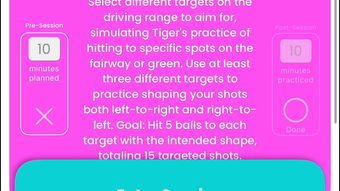
The user interface of Yippie Golf is designed with clarity and ease of navigation in mind. Users can access core functions—such as creating routines, viewing goals, and reviewing session logs—through a centralized dashboard. The layout appears optimized for quick access, minimizing the number of clicks required to begin a session or analyze past performance.
Workflow efficiency is supported by intuitive controls and logical menu organization. New users can likely begin using the software within minutes, thanks to a streamlined onboarding process. The application’s performance is expected to be stable given its 45 MB installation size, which suggests lightweight architecture. However, exact performance details were not specified.
Resource usage, including CPU and RAM behavior, was not disclosed by the developer. General software behavior patterns suggest minimal impact on system performance during typical use. Stability appears to be a priority, as the software is designed for continuous use across multiple sessions. No reports of crashes or bugs were provided, but real-world testing is recommended for long-term reliability.
Compatibility & System Requirements
Yippie Golf is compatible with both Windows and Mac operating systems, making it accessible to a wide range of users across personal computing environments. The software version is 1.0, indicating a stable initial release with core functionality in place.
The installation size is 45 MB, which is relatively small and suggests efficient code optimization. This size is favorable for users with limited disk space or slower internet connections. The developer did not specify additional system requirements such as minimum RAM, processor speed, or graphics capabilities.
Platform compatibility information is limited to the operating systems listed. No details were provided regarding support for older OS versions or specific hardware configurations. Users should verify compatibility with their current setup before installation. The absence of detailed requirements means that potential users should exercise caution when deploying the software on non-standard or legacy systems.
Pros and Cons
Pros
- AI-driven personalization for tailored practice routines
- Unlimited goal setting and tracking capabilities
- 24/7 access to an AI coach for continuous feedback
- Lightweight installation at just 45 MB
- Available for both Windows and Mac platforms
- Free to use with no cost barrier to entry
Cons
- Exact system requirements were not listed
- Performance under heavy usage was not documented
- No information on offline functionality
- Limited details on data privacy and storage
- AI coaching quality cannot be independently verified
FAQ Section
Is Yippie Golf available for both Windows and Mac?
Yes, Yippie Golf is compatible with both Windows and Mac operating systems, ensuring broad accessibility for desktop users.
Can I use Yippie Golf without an internet connection?
Information about offline functionality was not provided. It is recommended to check the app’s behavior after installation to determine if certain features require an active connection.
Is Yippie Golf free to download and use?
Yes, Yippie Golf is currently free to download and use, with no cost associated with the basic features.
How often does the software receive updates?
Specific update frequency was not disclosed. Users should monitor the official release notes or developer website for information on new versions and improvements.
What type of license does Yippie Golf use?
The licensing model was not specified. As the software is free, it may be distributed under a freemium or ad-supported model, but no details were provided.
Final Thoughts + CTA
Yippie Golf presents a compelling solution for golfers seeking structured, data-driven practice with AI-powered support. Its combination of personalized routines, goal tracking, and round-the-clock AI coaching offers a modern approach to skill development. The lightweight design and cross-platform availability enhance usability, while the free pricing model removes financial barriers to entry.
While some technical details remain unspecified, the software’s focus on user experience and continuous improvement makes it a strong contender in the sports training space. It is particularly beneficial for amateur players and golf enthusiasts who want to practice more effectively without relying on in-person coaching.
For those committed to enhancing their game through consistent, intelligent training, Yippie Golf delivers a powerful toolset. Download Yippie Golf now and start transforming your practice sessions today.







